Design Systems for Blogs: Why Consistency Matters
Design Systems for Blogs: Why Consistency Matters
When most people hear the term “design system,” they think of massive corporate style guides maintained by dedicated teams at companies like Google, IBM, or Shopify. It sounds like something far too complex for a blog. But that perception is wrong, and it is costing bloggers and small publishers real opportunities.
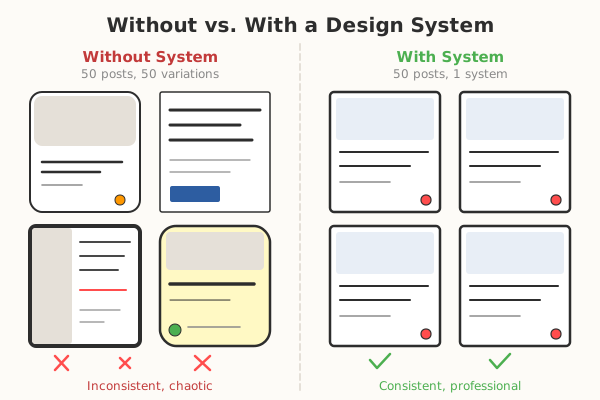
A design system, at its core, is simply a collection of reusable decisions. It documents how your blog looks, feels, and behaves – from the colors and fonts you use to the way buttons are styled and how content blocks are structured. Whether you run a personal blog or manage a multi-author publishing platform, implementing a design system will save you time, improve your reader experience, and strengthen your brand.
What Exactly Is a Design System?
A design system is more than a style guide and more than a component library, though it contains elements of both. It is a single source of truth for all design decisions that affect your blog.
The Three Layers
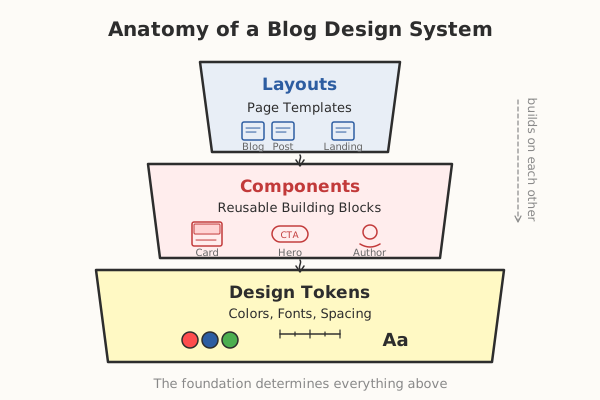
- Design Tokens: The foundational values – colors, spacing units, font sizes, border radii, shadows, and breakpoints. These are the atoms of your system.
- Components: Reusable interface elements built from design tokens – buttons, cards, navigation bars, blockquotes, code blocks, author bios, and newsletter signup forms.
- Patterns: Combinations of components that solve specific design problems – a blog post layout, a category archive page, a sidebar with related posts and a newsletter form.
For a blog, you do not need the same level of complexity as a SaaS product. But having even a lightweight system documented and consistently applied makes an outsized difference.
Why Blogs Need Design Systems
Visual Consistency Builds Trust
Readers form subconscious judgments about your credibility within milliseconds of landing on your site. If your heading sizes vary from post to post, if your link colors are inconsistent, or if your spacing feels random, those subtle signals erode trust. A design system eliminates this problem by ensuring every page follows the same visual rules.
Faster Content Production
When you have predefined components – a standard image layout, a consistent callout box, a uniform recipe card or code snippet block – creating new content becomes faster. You are not making design decisions with every new post. You are filling in a proven template with fresh content.
Easier Collaboration
If you work with guest authors, freelance designers, or developers, a design system serves as a shared language. Instead of explaining “make the heading look like the one on that post from three months ago,” you can point to a documented component with specific values.
Simplified Maintenance
When you decide to update your blog’s primary color or change your heading font, a well-structured design system means you change one value and it propagates everywhere. Without a system, you are hunting through dozens of CSS files or template overrides trying to find every instance.
Building a Design System for Your Blog: Step by Step
Step 1: Audit Your Current Design
Before building anything new, document what you already have. Go through your existing blog and catalog:
- Colors: Every color currently in use, including text colors, backgrounds, link colors, border colors, and accent colors.
- Typography: Every font family, weight, and size you use. Note where each is applied.
- Spacing: The margin and padding values throughout your layouts. Look for inconsistencies.
- Components: Every distinct UI element – buttons, forms, cards, navigation, footer, blockquotes, lists, tables.
This audit will reveal inconsistencies you did not know existed. That is normal and expected. The goal is to identify them so you can resolve them.
Step 2: Define Your Design Tokens
Design tokens are named values that replace hard-coded CSS values throughout your site. They create a single source of truth.
Color Tokens
Start with a minimal palette:
- Primary color: Your main brand color, used for links, buttons, and key accents.
- Secondary color: A complementary color for less prominent interactive elements.
- Neutral scale: A range of grays from near-white to near-black for text, borders, and backgrounds.
- Semantic colors: Success (green), warning (amber), error (red), info (blue) for alerts and status messages.
Define each color with a clear name. Use names that describe function, not appearance: color-primary is better than color-blue, because if your brand color changes from blue to teal, the name still makes sense.
Spacing Tokens
Adopt a consistent spacing scale. A popular approach is a base-4 or base-8 system:
space-1: 4pxspace-2: 8pxspace-3: 12pxspace-4: 16pxspace-6: 24pxspace-8: 32pxspace-12: 48pxspace-16: 64px
Use these tokens for all margins, padding, and gaps. The constraint of a fixed scale prevents arbitrary spacing values from creeping in over time.
Typography Tokens
Define a type scale with clear hierarchy:
- Display: Large, attention-grabbing headings for hero sections.
- H1 through H4: Standard heading levels with decreasing size and weight.
- Body: Your standard paragraph text, typically 16-18px for comfortable reading.
- Small: Metadata, captions, and secondary text.
- Code: Monospace font for inline code and code blocks.
For each level, specify the font family, font weight, font size, line height, and letter spacing.
Step 3: Build Your Component Library
With tokens defined, build your reusable components. For a blog, the essential components typically include:
Navigation
- Header with logo, navigation links, and optional search
- Mobile menu (hamburger or slide-out)
- Breadcrumbs for deeper content structures
Content Components
- Article header: Title, author, date, reading time, category badge
- Body text: Paragraphs, lists (ordered and unordered), blockquotes
- Images: Standard inline image, full-width image, image with caption, image gallery
- Code blocks: Syntax-highlighted code with language label and copy button
- Callout boxes: Tip, warning, note, and info variants
- Tables: Responsive tables that work on mobile
- Embedded media: YouTube, Twitter, and other third-party embeds with consistent sizing
Sidebar and Supplementary Components
- Author bio card
- Related posts list
- Newsletter signup form
- Table of contents
- Social sharing buttons
- Tag and category lists
Footer
- Site-wide footer with navigation, legal links, and optional newsletter signup
Step 4: Document Everything
A design system that exists only in code is incomplete. Documentation makes the system accessible to everyone who touches your blog.
For each component, document:
- Purpose: What problem does this component solve?
- Variants: What variations exist (sizes, colors, states)?
- Usage guidelines: When to use this component and when not to.
- Code example: A working snippet showing how to implement it.
- Visual example: A screenshot or rendered preview.
You do not need an elaborate documentation site. A well-organized Notion page, a section in your project’s README, or a simple static page works perfectly well.
Step 5: Implement With CSS Custom Properties
CSS Custom Properties (also known as CSS variables) are the most practical way to implement design tokens for a blog. They work natively in all modern browsers, require no build tools, and cascade naturally through your CSS.
Here is a simplified example of how your token definitions might look:
:root {
  /* Colors */
  --color-primary: #2563eb;
  --color-primary-hover: #1d4ed8;
  --color-text: #1f2937;
  --color-text-secondary: #6b7280;
  --color-background: #ffffff;
  --color-surface: #f9fafb;
  --color-border: #e5e7eb;

  /* Typography */
  --font-body: 'Inter', system-ui, sans-serif;
  --font-heading: 'Inter', system-ui, sans-serif;
  --font-mono: 'JetBrains Mono', monospace;

  /* Spacing */
  --space-4: 1rem;
  --space-6: 1.5rem;
  --space-8: 2rem;

  /* Border Radius */
  --radius-sm: 0.25rem;
  --radius-md: 0.5rem;
  --radius-lg: 1rem;
}
Every component then references these variables instead of hard-coded values. When you want to update your primary color, you change it in one place.
Common Mistakes to Avoid
Over-Engineering From the Start
You do not need a design system as complex as Material Design. Start with tokens and a handful of core components. Expand only when you encounter a real need.
Ignoring Dark Mode
In 2026, dark mode support is expected. Design your token system with both light and dark themes in mind from the beginning. CSS Custom Properties make this straightforward by redefining token values inside a prefers-color-scheme: dark media query or a .dark class.
Treating the System as Static
A design system is a living document. As your blog evolves, your system should evolve with it. Schedule periodic reviews – quarterly is a good cadence – to identify components that need updating, tokens that need adjusting, or new patterns that should be formalized.
Skipping Accessibility
Every component in your system should meet WCAG 2.2 AA standards at minimum. This means:
- Sufficient color contrast ratios (4.5:1 for normal text, 3:1 for large text)
- Keyboard navigability for all interactive components
- Proper ARIA labels where needed
- Focus indicators that are clearly visible
Accessibility is not an add-on. It is a foundational requirement that should be built into every component from the start.
Design Systems for Different Blog Platforms
WordPress
WordPress themes can implement design systems through theme.json (for block themes) which defines colors, typography, spacing, and layout settings. This file acts as a design token layer that the block editor respects.
Static Site Generators (Hugo, Eleventy, Astro)
These platforms are particularly well-suited for design systems because you have full control over the HTML, CSS, and component structure. Define tokens in CSS custom properties, create reusable partials or components, and use your build process to enforce consistency.
Headless CMS With a Frontend Framework
If your blog uses a headless CMS like Sanity, Contentful, or Strapi with a React, Vue, or Svelte frontend, you can implement a full component library using your framework’s component model. Tools like Storybook let you develop and document components in isolation.
The ROI of a Blog Design System
Investing time in a design system pays dividends in several measurable ways:
- Reduced design debt: No more accumulating one-off styles that make future changes painful.
- Faster page load times: Consistent components mean less redundant CSS and more efficient stylesheets.
- Higher reader engagement: Visual consistency and polished presentation keep readers on your site longer.
- Stronger brand recognition: When every page feels intentionally designed, readers remember your blog.
- Lower maintenance costs: Changes propagate from a single source instead of requiring manual updates across dozens of templates.
Getting Started Today
You do not need to build your entire design system before publishing your next post. Start small:
- Define your color palette and typography scale this week.
- Convert hard-coded CSS values to custom properties next week.
- Identify your five most-used components and standardize them over the following two weeks.
- Document what you have built.
- Iterate and expand as your blog grows.
Want to see what different design systems look like in practice? Visit our Visual Design Examples page — you can interactively switch between five distinct styles.
A design system is not a project with a finish line. It is an ongoing practice that becomes more valuable over time. The sooner you start, the sooner you reap the benefits of a blog that looks, feels, and performs like a professional publication – because it is built like one.

Ready for Your Next Project?
Whether it is a blog, a corporate website, or a custom platform – let's build it together. Professional, SEO-optimized, and tailored to your needs.
Start Your Project